Supercomputer
This section will show you how to configure the COMPSs framework in supercomputers (e.g. HPC, Cluster, etc).
Configuration
To maintain the portability between different environments, COMPSs has a
pre-built structure of scripts to execute applications in Supercomputers.
For this purpose, users must use the enqueue_compss script provided in the
COMPSs installation and specify the supercomputer configuration with
--sc_cfg flag.
When installing COMPSs for a supercomputer, system administrators must define
a configuration file for the specific Supercomputer parameters.
This document gives and overview about how to modify the configuration files
in order to customize the enqueue_compss for a specific queue system and
supercomputer.
As overview, the easier way to proceed when creating a new configuration is to
modify one of the configurations provided by COMPSs. System administrators can
find configurations for LSF, SLURM, PBS and SGE as well as
several examples for Supercomputer configurations in
<installation_dir>/Runtime/scripts/queues.
For instance, the configuration for the MareNostrum IV Supercomputer and the
Slurm queue system, can be used as base file for new supercomputer and queue
system cfgs. Sysadmins can modify these files by changing the flags,
parameters, paths and default values that corresponds to your supercomputer.
Once, the files have been modified, they must be copied to the queues folder
to make them available to the users. The following paragraph describe more
in detail the scripts and configuration files
If you need help, contact support-compss@bsc.es.
COMPSs Queue structure overview
All the scripts and cfg files shown in Figure 6 are located
in the <installation_dir>/Runtime/scripts/ folder.
enqueue_compss and launch_compss (launch.sh in the figure) are in
the user subfolder and submit.sh and the cfgs are located in queues.
There are two types of cfg files: the queue system cfg files, which are
located in queues/queue_systems; and the supercomputers.cfg files, which
are located in queues/supercomputers.
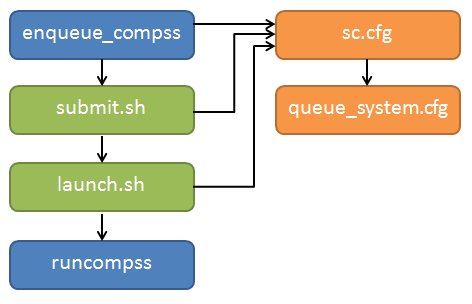
Figure 6 Structure of COMPSs queue scripts. In Blue user scripts, in Green queue scripts and in Orange system dependent scripts
Configuration Files
The cfg files contain a set of bash variables which are used by the other scripts. On the one hand, the queue system cfgs contain the variables to indicate the commands used by the system to submit and spawn processes, the commands or variables to get the allocated nodes and the directives to indicate the number of nodes, processes, etc. Below you can see an example of the most important variable definition for Slurm
# File: Runtime/scripts/queues/queue_systems/slurm.cfg

################################
## SUBMISSION VARIABLES
################################
# Variables to define the queue system directives.
# The are built as #${QUEUE_CMD} ${QARG_*}${QUEUE_SEPARATOR}value (submit.sh)
QUEUE_CMD="SBATCH"
SUBMISSION_CMD="sbatch"
SUBMISSION_PIPE="< "
SUBMISSION_HET_SEPARATOR=' : '
SUBMISSION_HET_PIPE=" "

# Variables to customize the commands know job id and allocated nodes (submit.sh)
ENV_VAR_JOB_ID="SLURM_JOB_ID"
ENV_VAR_NODE_LIST="SLURM_JOB_NODELIST"

QUEUE_SEPARATOR=""
EMPTY_WC_LIMIT=":00"

QARG_JOB_NAME="--job-name="
QARG_JOB_DEP_INLINE="false"
QARG_JOB_DEPENDENCY_OPEN="--dependency=afterany:"
QARG_JOB_DEPENDENCY_CLOSE=""

QARG_JOB_OUT="-o "
QARG_JOB_ERROR="-e "
QARG_WD="--workdir="
QARG_WALLCLOCK="-t"

QARG_NUM_NODES="-N"
QARG_NUM_PROCESSES="-n"
QNUM_PROCESSES_VALUE="\$(expr \${num_nodes} \* \${req_cpus_per_node})"
QARG_EXCLUSIVE_NODES="--exclusive"
QARG_SPAN=""

QARG_MEMORY="--mem="
QARG_QUEUE_SELECTION="-p "
QARG_NUM_SWITCHES="--gres="
QARG_GPUS_PER_NODE="--gres gpu:"
QARG_RESERVATION="--reservation="
QARG_CONSTRAINTS="--constraint="
QARG_QOS="--qos="
QARG_OVERCOMMIT="--overcommit"
QARG_CPUS_PER_TASK="-c"
QJOB_ID="%J"
QARG_PACKJOB="packjob"

################################
## LAUNCH VARIABLES
################################
# Variables to customize worker process spawn inside the job (launch_compss)
LAUNCH_CMD="srun"
LAUNCH_PARAMS="-n1 -N1 --nodelist="
LAUNCH_SEPARATOR=""
CMD_SEPARATOR=""
HOSTLIST_CMD="scontrol show hostname"
HOSTLIST_TREATMENT="| awk {' print \$1 '} | sed -e 's/\.[^\ ]*//g'"

################################
## QUEUE VARIABLES
##  - Used in interactive
##  - Substitute the %JOBID% keyword with the real job identifier dinamically
################################
QUEUE_JOB_STATUS_CMD="squeue -h -o %T --job %JOBID%"
QUEUE_JOB_RUNNING_TAG="RUNNING"
QUEUE_JOB_NODES_CMD="squeue -h -o %N --job %JOBID%"
QUEUE_JOB_CANCEL_CMD="scancel %JOBID%"
QUEUE_JOB_LIST_CMD="squeue -h -o %i"
QUEUE_JOB_NAME_CMD="squeue -h -o %j --job %JOBID%"

################################
## CONTACT VARIABLES
################################
CONTACT_CMD="ssh"
To adapt this script to your queue system, you just need to change the variable value to the command, argument or value required in your system. If you find that some of this variables are not available in your system, leave it empty.
On the other hand, the supercomputers cfg files contains a set of variables to indicate the queue system used by a supercomputer, paths where the shared disk is mounted, the default values that COMPSs will set in the project and resources files when they are not set by the user and flags to indicate if a functionality is available or not in a supercomputer. The following lines show examples of this variables for the MareNostrum IV supercomputer.
# File: Runtime/scripts/queues/supercomputers/mn5.cfg

################################
## STRUCTURE VARIABLES
################################
QUEUE_SYSTEM="slurm"

################################
## ENQUEUE_COMPSS VARIABLES
################################
DEFAULT_EXEC_TIME=10
DEFAULT_NUM_NODES=2
DEFAULT_NUM_SWITCHES=0
MAX_NODES_SWITCH=18
MIN_NODES_REQ_SWITCH=4
DEFAULT_QUEUE=default
DEFAULT_MAX_TASKS_PER_NODE=-1
DEFAULT_CPUS_PER_NODE=112
DEFAULT_FORWARD_CPUS_PER_NODE="true"
DEFAULT_IO_EXECUTORS=0
DEFAULT_GPUS_PER_NODE=0
DEFAULT_FPGAS_PER_NODE=0
DEFAULT_WORKER_IN_MASTER_CPUS=100
DEFAULT_WORKER_IN_MASTER_MEMORY=200
DEFAULT_JOB_EXECUTION_DIR=.
DEFAULT_WORKER_WORKING_DIR=local_disk
DEFAULT_NETWORK=infiniband
DEFAULT_DEPENDENCY_JOB=None
DEFAULT_RESERVATION=disabled
DEFAULT_NODE_MEMORY=disabled
DEFAULT_JVM_MASTER=""
DEFAULT_JVM_WORKERS="-Xms16000m,-Xmx92000m,-Xmn1600m"
DEFAULT_JVM_WORKER_IN_MASTER=""
DEFAULT_QOS=default
DEFAULT_CONSTRAINTS=disabled
DEFAULT_LICENSES=disabled
DEFAULT_NODE_MEMORY_SIZE=256
DEFAULT_NODE_STORAGE_BANDWIDTH=450

################################
## Enabling/disabling passing
## requirements to queue system
################################
DISABLE_QARG_MEMORY=true
DISABLE_QARG_CONSTRAINTS=false
DISABLE_QARG_LICENSES=true
DISABLE_QARG_QOS=false
DISABLE_QARG_OVERCOMMIT=true
DISABLE_QARG_CPUS_PER_TASK=false
DISABLE_QARG_NVRAM=true
HETEROGENEOUS_MULTIJOB=false
ENABLE_PROJECT_NAME=true

################################
## SUBMISSION VARIABLES
################################
MINIMUM_NUM_NODES=1
MINIMUM_CPUS_PER_NODE=1
DEFAULT_STORAGE_HOME="null"
DISABLED_STORAGE_HOME="null"

################################
## LAUNCH VARIABLES
################################
LOCAL_DISK_PREFIX="/scratch/tmp"
REMOTE_EXECUTOR="none"  # Disable the ssh spawn at runtime
NETWORK_INFINIBAND_SUFFIX="-ib0"  # Hostname suffix to add in order to use infiniband network
NETWORK_DATA_SUFFIX="-data"  # Hostname suffix to add in order to use data network
SHARED_DISK_PREFIX="/gpfs/"
SHARED_DISK_2_PREFIX="/home/"
MASTER_NAME_CMD=hostname  # Command to know the mastername
ELASTICITY_BATCH=true
To adapt this script to your supercomputer, you just need to change the variables to commands paths or values which are set in your system. If you find that some of this values are not available in your system, leave them empty or as they are in the MareNostrum IV.
How are cfg files used in scripts?
The submit.sh is in charge of getting some of the arguments from
enqueue_compss, generating the a temporal job submission script for the
queue_system (function create_normal_tmp_submit) and performing the
submission in the scheduler (function submit).
The functions used in submit.sh are implemented in common.sh.
If you look at the code of this script, you will see that most of the code is
customized by a set of bash vars which are mainly defined in the cfg files.
For instance the submit command is customized in the following way:
eval ${SUBMISSION_CMD} ${SUBMISSION_PIPE}${TMP_SUBMIT_SCRIPT}
Where ${SUBMISSION_CMD} and ${SUBMISSION_PIPE} are defined in the
queue_system.cfg. So, for the case of Slurm, at execution time it is
translated to something like sbatch < /tmp/tmp_submit_script
The same approach is used for the queue system directives defined in the submission script or in the command to get the assigned host list.
The following lines show the examples in these cases.
#${QUEUE_CMD} ${QARG_JOB_NAME}${QUEUE_SEPARATOR}${job_name}
In the case of Slurm in MN, it generates something like #SBATCH --job-name=COMPSs
host_list=\$(${HOSTLIST_CMD} \$${ENV_VAR_NODE_LIST}${env_var_suffix} ${HOSTLIST_TREATMENT})
The same approach is used in the launch_compss script where it is using
the defined vars to customize the project.xml and resources.xml file
generation and spawning the master and worker processes in the assigned resources.
At first, you should not need to modify any script. The goal of the cfg files is that sysadmins just require to modify the supercomputers cfg, and in the case that the used queue system is not in the queue_systems, folder it should create a new one for the new one.
If you think that some of the features of your system are not supported in the current implementation, please contact us at support-compss@bsc.es. We will discuss how it should be incorporated in the scripts.