📜 Schedulers
This documentation provides an in-depth overview of the COMPSs scheduling system. It explains how tasks are managed and scheduled within the runtime. Additionally, COMPSs offers a variety of scheduling strategies—each designed with a specific function and purpose—that will be described in detail in later sections.
Purpose and objectives
The COMPSs schedulers are responsible for dynamically assigning tasks to available computational resources (workers) while respecting task dependencies, resource constraints, and user-defined priorities. This ensures that applications execute efficiently regardless of the underlying hardware or system load.
Optimize Task Execution: Improve overall execution times by carefully balancing the load across multiple resources.
Adapt to Changing Conditions: Dynamically reassign and reschedule tasks based on real-time resource availability and system state.
Facilitate Extensibility: Provide a framework that allows for different scheduling strategies—each with its unique trade-offs—to be integrated and used according to specific execution scenarios.
Scheduling Architecture Overview
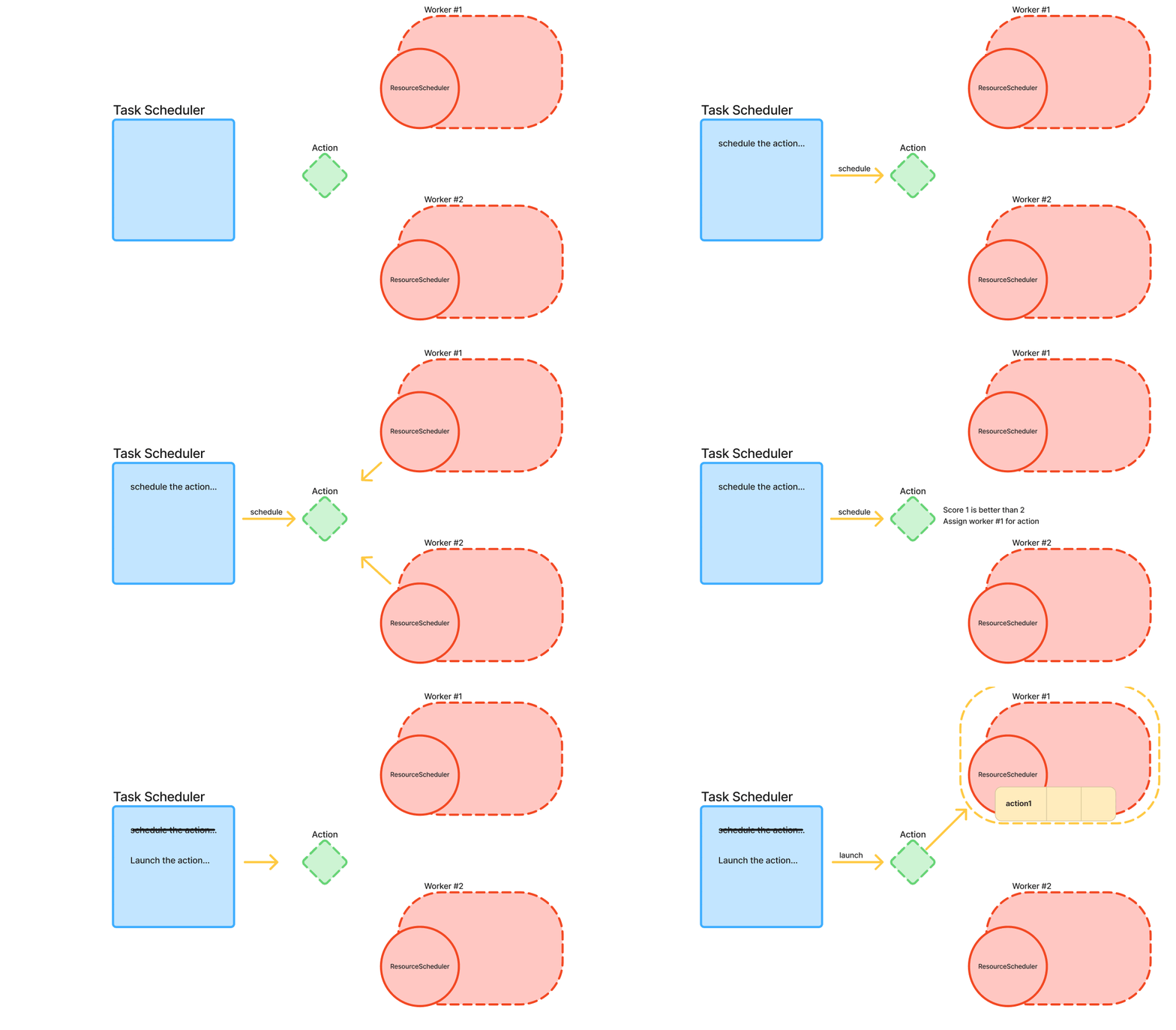
The COMPSs scheduling architecture is based on a two-level model that separates global task orchestration from local resource management:
- TaskScheduler:
Receiving new tasks (referred to as allocatable actions).
Determining the best candidate resources based on multiple scoring metrics (e.g., task priority, resource availability, data locality).
Coordinating with resource schedulers to ensure that tasks are executed when their dependencies are satisfied.
- ResourceScheduler:
Maintains a list of tasks currently running on the resource.
Manages a priority queue for tasks that are blocked (due to insufficient local resources or pending dependencies).
Calculates detailed scores for tasks based on current local conditions.
Provided Schedulers and Strategies
COMPSs provides a wide range of scheduler implementations, each made to be used in different execution scenarios and performance objectives. These schedulers are organized into three main families, each employing unique strategies to manage task dependencies and resource constraints. In this section, we detail these families, explain their characteristics, and discuss their typical use cases, so that a COMPSs user is able to select the one they want to use.
Order Strict Schedulers
Order strict schedulers enforce a strict execution order based on task priorities once a task becomes dependency-free. Only the dependency-free task with the higher priority (score) is eligible for execution, even if there are free resources available that could otherwise run lower-priority tasks.
- Key Characteristics:
Strict Priority Enforcement: No task overtakes a higher-priority dependency-free task.
Predictable Execution Order: Tasks are generally scheduled in a First-In-First-Out (FIFO) manner, based on their generation order.
Flag to use it: --scheduler=es.bsc.compss.scheduler.orderstrict.fifo.FifoTS
Use Cases: This family is ideal when it is critical to maintain a strict task order, ensuring that high-priority tasks are executed as soon as they become eligible, regardless of resource availability.
Lookahead Schedulers
Lookahead schedulers also assign priorities to tasks as they become dependency-free. However, they provide more flexibility by allowing tasks with a lower priority to be executed if resources are insufficient to run the highest-priority task immediately. This approach can improve resource utilization and overall throughput in certain conditions.
Variants and Key Strategies:
- FIFO and LIFO Variants:
- FIFO (First-In, First-Out):
Tasks are scheduled in the order they are generated.
Flag:
--scheduler=es.bsc.compss.scheduler.lookahead.fifo.FifoTS
- LIFO (Last-In, First-Out):
Tasks are scheduled in the inverse order of their arrival.
Flag:
--scheduler=es.bsc.compss.scheduler.lookahead.lifo.LifoTS
- Locality-Based Variant:
Prioritizes tasks based on data locality first, then uses FIFO order for tie-breaking.
Flag:
--scheduler=es.bsc.compss.scheduler.lookahead.locality.LocalityTSCommonly used as the default scheduler for runcompss executions, where data locality can significantly impact performance.
Successors-Based Variants:
These variants give higher priority to tasks that become dependency-free as a result of predecessor tasks’ completion. This “successor” approach is designed to accelerate the overall workflow by quickly unlocking subsequent tasks.
- Locality-Enhanced Successors:
Prioritizes the successors of a completed task, then considers data locality, and finally the task generation order.
If there are no weights defined for the parameters, it takes into account the number of parameters in each node.
This scheduler does not take into account the size of the data nor the transfer speed.
Flag:
--scheduler=es.bsc.compss.scheduler.lookahead.successors.locality.LocalityTSTypically used for local disk executions on supercomputers (SCs).
- FIFO/LIFO Successors:
Variants that, after prioritizing successors, schedule tasks in either FIFO or LIFO order.
FIFO Flag:
--scheduler=es.bsc.compss.scheduler.lookahead.successors.fifo.FifoTSLIFO Flag:
--scheduler=es.bsc.compss.scheduler.lookahead.successors.lifo.LifoTS
- Multi-Threaded Successors Variants:
These versions (prefixed with
mt) are designed for multi-threaded scheduling, enhancing scheduling throughput:- Flags:
--scheduler=es.bsc.compss.scheduler.lookahead.mt.successors.locality.LocalityTS--scheduler=es.bsc.compss.scheduler.lookahead.mt.successors.fifo.FifoTS--scheduler=es.bsc.compss.scheduler.lookahead.mt.successors.lifo.LifoTS
- Constraint-Aware Successors:
Prioritize successors, then consider the tasks based on its resource constraints (e.g., computing units), and finally apply FIFO order.
Default Flag:
--scheduler=es.bsc.compss.scheduler.lookahead.successors.constraintsfifo.ConstraintsFifoTSMulti-Threaded:
--scheduler=es.bsc.compss.scheduler.lookahead.mt.successors.constraintsfifo.ConstraintsFifoTS
Use Cases: Lookahead schedulers are beneficial when balancing strict prioritization with overall resource utilization. They are particularly useful in environments where resource availability can be a bottleneck, and allowing lower-priority tasks to run prevents idle resources and increases throughput.
Full Graph Schedulers
Full graph schedulers take a global view of the entire application’s task graph. They not only consider data dependencies but also explicitly manage resource dependencies among tasks. These schedulers dynamically redefine resource dependencies to optimize execution based on multiple objectives.
- Key Characteristics:
Global Optimization: Considers the complete task graph rather than only dependency-free tasks.
Multi-Objective Function: Often employs a multi-objective function that balances execution time, energy consumption, and cost.
Flag:
scheduler=es.bsc.compss.scheduler.fullgraph.multiobjective.MOScheduler
Use Cases: Full graph schedulers are best suited for complex workflows where a global optimization can yield significant improvements. Their comprehensive approach is ideal in scenarios where trade-offs between execution time, energy, and cost are critical, although this may come at the expense of higher computational overhead during scheduling.
Predefined Scheduler
The Predefined Scheduler is a specialized task scheduler for COMPSs that allows users to specify a predetermined execution plan for their tasks. Instead of relying on dynamic scheduling decisions, this scheduler follows a predefined configuration that specifies exactly which tasks should run on which resources and in what order.
- Key Characteristics
Follow a predefined plan: Follows exactly the predefined plan set by the user at
scheduler_config_file.Scheduling dependencies: A new type of dependency can be added in this scheduler.
Flag:
scheduler=es.bsc.compss.scheduler.predefined.PredefinedTS scheduler_config_file=path/to/config.json
- Use Cases
Reproducibility: Ensure tasks execute in the exact same order across multiple runs.
Performance Optimization: Apply a pre-computed optimal scheduling plan.
Testing and Debugging: Validate specific execution scenarios.
Resource-Constrained Environments: Explicitly control task placement on specific resources.
Note
Only resource-level scheduling is supported, NOT thread-level scheduling, therefore the traces may vary between executions, but the execution pattern stays the same. To see extended information about this scheduler and how to use it check How it works and subsequent sections.
How it works
- The Predefined Scheduler reads a JSON configuration file that defines:
Task execution order - Which tasks to execute
Implementation selection - Which implementation to use for tasks with multiple options
Task dependencies - Which tasks must complete before others can start
Resource assignments - Which worker should execute each task
The scheduler then enforces this plan during execution, ensuring tasks are scheduled exactly as specified.
Configuration Format
Basic Structure
The configuration is a JSON file containing an array of task definitions:
[
    {
        "taskId": 1,
        "implementationId": 0,
        "predecesors": [],
        "resource": "COMPSsWorker01"
    },
    {
        "taskId": 2,
        "implementationId": 0,
        "predecesors": [1],
        "resource": "COMPSsWorker01"
    }
]
Field Descriptions
- taskId (required)
Type: Integer
Description: Unique identifier for the task
Example: 1, 2, 3, etc.
Note: Task IDs are assigned by COMPSs in the order tasks are created
- implementationId (required)
Type: Integer
Description: Specifies which implementation to use for this task
Default: 0 (first implementation)
Use Case: For tasks with multiple implementations (e.g., CPU vs GPU),this selects which one to execute
- predecessors (required)
Type: Array of integers
Description: List of task IDs that must complete before this task can start
Example: [] (no dependencies), [1], [1, 2, 3]
Note: Empty array means the task can start immediately
- resource (required for single-node tasks)
Type: String
Description: Name of the worker that should execute this task
Example: “COMPSsWorker01”
Note: Must match worker names defined in project.xml and resources.xml
- resources (required for multi-node tasks)
Type: Array of strings
Description: List of workers for multi-node tasks
Example: [“COMPSsWorker01”, “COMPSsWorker02”, “COMPSsWorker03”]
Note: Use this instead of resource for tasks that require multiple nodes
Usage
Step 1: Create Configuration File Create a JSON file (e.g., schedule_config.json) with your task scheduling plan:
[
    {
        "taskId": 1,
        "implementationId": 0,
        "predecesors": [],
        "resource": "COMPSsWorker01"
    },
    {
        "taskId": 2,
        "implementationId": 0,
        "predecesors": [1],
        "resource": "COMPSsWorker02"
    },
    {
        "taskId": 3,
        "implementationId": 0,
        "predecesors": [1,2],
        "resource": "COMPSsWorker01"
    }
]
Step 2: Run COMPSs with Predefined Scheduler
Use the --scheduler and --scheduler_config_file flags:
$ runcompss --scheduler=es.bsc.compss.scheduler.predefined.PredefinedTS --scheduler_config_file=/path/to/schedule_config.json --project=/path/to/project.xml --resources=/path/to/resources.xml app.py
Step 3: Verify execution Check the traces to see your scheduling.
Complete Example
Application Code (example.py)
from pycompss.api.task import task
from pycompss.api.api import compss_wait_on

@task(returns=int)
def compute(value):
    return value * 2

def main():
    # Create 5 tasks
    results = []
    for i in range(1, 6):
        result = compute(i)
        results.append(result)

    # Wait for results
    for i, result in enumerate(results):
        final = compss_wait_on(result)
        print(f"Task {i+1} result: {final}")

if __name__ == "__main__":
    main()
Configuration File (config.json)
[
{
    "taskId": 1,
    "implementationId": 0,
    "predecessors": [],
    "resource": "COMPSsWorker01"
},
{
    "taskId": 2,
    "implementationId": 0,
    "predecessors": [1],
    "resource": "COMPSsWorker01"
},
{
    "taskId": 3,
    "implementationId": 0,
    "predecessors": [],
    "resource": "COMPSsWorker02"
},
{
    "taskId": 4,
    "implementationId": 0,
    "predecessors": [2, 3],
    "resource": "COMPSsWorker01"
},
{
    "taskId": 5,
    "implementationId": 0,
    "predecessors": [4],
    "resource": "COMPSsWorker02"
}
]
Execution
$ runcompss --scheduler=es.bsc.compss.scheduler.predefined.PredefinedTS --scheduler_config_file=config.json example.py
Advanced Features
Multi-Node Tasks
For tasks that require multiple nodes (e.g., MPI tasks), use the resources field:
{
"taskId": 1,
"implementationId": 0,
"predecessors": [],
"resources": [
    "COMPSsWorker01",
    "COMPSsWorker02",
    "COMPSsWorker03"
]
}
Multiple Implementations
If a task has multiple implementations (e.g., CPU and GPU versions), specify which one to use:
{
"taskId": 1,
"implementationId": 0,  // Use CPU implementation
"predecessors": [],
"resource": "COMPSsWorker01"
},
{
"taskId": 2,
"implementationId": 1,  // Use GPU implementation
"predecessors": [1],
"resource": "COMPSsWorker02"
}
Generating Configuration from Logs
You can generate a configuration file from a previous execution’s runtime.log:
$ python3 generate_config.py runtime.log > config.json
This extracts the actual task scheduling that occurred and creates a configuration file that can be used to reproduce that exact execution.
You can find script examples on how to reproduce executions at the test suite:
tests/sources/local/python/4_scheduler_predefined/scripts/
Resource Name Mapping (SLURM)
When running on SLURM clusters, the Predefined Scheduler automatically maps logical resource names to actual SLURM nodes.
Design and operation
You specify logical names in your config:
{
    "taskId": 1,
    "resource": "COMPSsWorker01"
}
The scheduler reads SLURM_NODELIST and maps:
COMPSsWorker01 → gs10r3b01-ib0
COMPSsWorker02 → gs10r3b03-ib0
COMPSsWorker03 → gs10r3b68-ib0
The mapping is cyclic if you have more logical workers than physical nodes
Example
If SLURM_NODELIST=node[01-03] and your config has 5 workers:
COMPSsWorker01 → node01-ib0
COMPSsWorker02 → node02-ib0
COMPSsWorker03 → node03-ib0
COMPSsWorker04 → node01-ib0  (cycles back)
COMPSsWorker05 → node02-ib0
Limitations
Task ID Assignment: Task IDs must match the order COMPSs assigns them (based on task creation order in your application)
Dynamic Tasks: Not suitable for applications with dynamic task creation patterns
Resource Availability: Assumes all specified resources are available at execution time
No Runtime Adaptation: The schedule is fixed and won’t adapt to runtime conditions
Troubleshooting
Configuration Not Loaded
Symptom: Scheduler does not use your configuration
Solutions: - Check file path is absolute or relative to execution directory - Verify JSON syntax: python3 -m json.tool config.json - Check runtime.log for error messages
Tasks Not Scheduled as Expected
Symptom: Tasks execute in different order or on different resources
Solutions: - Verify task IDs match actual task creation order - Check that resource names match exactly (case-sensitive) - Ensure all dependencies are satisfied
Resource Not Found
Symptom: Error about unknown resource
Solutions: - Verify resource names in project.xml and resources.xml - Check for typos in resource names - Ensure workers are actually available
Invalid JSON
Symptom: Parser error when loading configuration
Solutions: * Validate JSON: python3 -m json.tool config.json * Check for:
Missing commas
Trailing commas (not allowed in JSON)
Unquoted strings
Mismatched brackets
FAQ
Q: Can I use this with any COMPSs application?
A: Yes, but it works best with applications that have predictable task creation patterns.
Q: How do I know what task IDs will be assigned?
A: Task IDs are assigned sequentially in the order tasks are created. You can run your application once with a default scheduler and extract the task IDs from the logs.
Q: Can I mix predefined scheduling with dynamic scheduling?
A: No, the Predefined Scheduler controls all task scheduling decisions.
Q: What happens if a task fails?
A: Standard COMPSs error handling applies. Failed tasks can be retried according to your COMPSs configuration.
Q: Can I update the configuration during execution?
A: No, the configuration is loaded once at startup and cannot be modified during execution.
Q: Does this work with all task types?
A: It supports regular tasks, multi-node tasks, and tasks with multiple implementations, but does NOT support reduce tasks.
Performance Considerations
When to Use Predefined Scheduler
- Good for:
Reproducible experiments
Known optimal schedules
Testing specific scenarios
Trace replay
- Not ideal for:
Highly dynamic workloads
Unknown task patterns
Adaptive scheduling needs
Load balancing across heterogeneous resources
Overhead
The Predefined Scheduler has minimal overhead:
- Configuration is loaded once at startup
- Scheduling decisions are  lookups
- No runtime optimization computations
lookups
- No runtime optimization computations
Schedulers Summary
Table with the provided schedulers within the COMPSs release:
Class name |
Family |
Description |
Comments |
|---|---|---|---|
es.bsc.compss.scheduler.orderstrict.fifo.FifoTS |
order-strict |
Prioritizes task generation order (FIFO). |
|
es.bsc.compss.scheduler.lookahead.fifo.FifoTS |
lookahead |
Prioritizes task generation order (FIFO). |
|
es.bsc.compss.scheduler.lookahead.lifo.LifoTS |
lookahead |
Prioritizes task generation order (LIFO). |
|
es.bsc.compss.scheduler.lookahead.locality.LocalityTS |
lookahead |
Prioritizes data location and then (FIFO) task generation. |
Default on runcompss executions |
es.bsc.compss.scheduler.lookahead.successors.locality.LocalityTS |
lookahead - successors |
Prioritizes the successors of the ended task, then the data locality on the worker and then the generation order. |
Default for local disk executions on SCs |
es.bsc.compss.scheduler.lookahead.mt.successors.locality.LocalityTS |
lookahead - successors |
Prioritizes the successors of the ended task, then the data locality on the worker and then the generation order. |
Multi-threaded implementation. |
es.bsc.compss.scheduler.lookahead.successors.fifo.FifoTS |
lookahead - successors |
Prioritizes the successors of the ended task, and then the generation order. |
|
es.bsc.compss.scheduler.lookahead.mt.successors.fifo.FifoTS |
lookahead - successors |
Prioritizes the successors of the ended task, and then the generation order. |
Multi-threaded implementation. Default for shared disk executions on SCs |
es.bsc.compss.scheduler.lookahead.successors.lifo.LifoTS |
lookahead - successors |
Prioritizes the successors of the ended task, and then the inverse generation order. |
|
es.bsc.compss.scheduler.lookahead.mt.successors.lifo.LifoTS |
lookahead - successors |
Prioritizes the successors of the ended task, and then the inverse generation order. |
Multi-threaded implementation. |
es.bsc.compss.scheduler.lookahead.successors.constraintsfifo.ConstraintsFifoTS |
lookahead - successors |
Prioritizes the successors of the ended task, then the task
constraints ( |
|
es.bsc.compss.scheduler.lookahead.mt.successors.constraintsfifo.ConstraintsFifoTS |
lookahead - successors |
Prioritizes the successors of the ended task, then the task
constraints ( |
Multi-threaded implementation. |
es.bsc.compss.scheduler.fullgraph.multiobjective.MOScheduler |
full graph |
Based on a multi-objective function (time, energy, cost). |
|
es.bsc.compss.scheduler.predefined.PredefinedTS |
predefined |
Allows users to specify a predetermined execution plan for their tasks. The scheduler follows this exact configuration. |
Users need to create their own scheduling plan. |
Specifying the --scheduler=<class> option when launching a COMPSs execution with
enqueue_compss or runcompss selects the scheduler that will drive the execution.
In the case of having an agents deployment, the option indicates the scheduler used by
that agent; agents deployment allows combining different scheduling strategies by
setting up a different policy on each agent.
Optimizing using previous task profiles
COMPSs leverages task execution profiles and configurable parameters to optimize scheduling decisions throughout an application’s lifecycle. These profiles capture key performance metrics (such as average, minimum, and maximum execution times) for each task implementation, enabling the scheduler to estimate resource usage and execution duration accurately. At startup, users can provide an input profile file using the --input_profile=<path> option, which allows the scheduler to utilize historical performance data from the very beginning, thereby improving early task assignment decisions. As tasks are executed, the scheduler dynamically updates these profiles and incorporates this information into its scoring functions, which penalize slower implementations. Upon completion, the updated profiles are saved via the --output_profile=<path> option, creating a continuous learning loop that adapts to changes in resource performance and workload characteristics over time. This integration of execution profiles not only enhances scheduling accuracy but also improves load balancing and overall resource utilization, leading to more predictable and efficient distributed execution of tasks.
Controlling the number of tasks to schedule
Schedulers and other objects of the runtime may suffer some overload if the number of tasks grows uncontrollably. As a consequence of this overload, the performance of the runtime may be impacted in some cases. This only occurs in a small amount of applications with very specific characteristics. However, the runtime incorporates a tool to control and limit the number of tasks waiting to be scheduled. The control of the number of tasks can be done through the usage of two environment variables.
Environment Variables
COMPSS_TRHOTTLE_MAX_TASKS: This environment variable defines the maximum number of tasks that the runtime can have in the queue for scheduling. Once the number of waiting tasks reaches this number the runtime stops the task generation. This environment variable must be defined as an integer.
COMPSS_THROTTLE_INTERVAL: This environment variable defines the number of tasks that must be scheduled when the number of tasks reaches the limit before the runtime starts to generate new tasks again. This environment variable must be an integer.
In order to clarify, for example, if the COMPSS_TRHOTTLE_MAX_TASKS is defined to 100000 and the COMPSS_TRHOTTLE_MAX_TASKS variable is set to 10000, the runtime will create tasks until it has 100000 tasks that are not scheduled and are pending to be scheduled. The task generation will not stop if the runtime never reaches the number of 100000 tasks waiting to be scheduled. Once this number is reached, the runtime has to execute 10000 tasks before it again generates tasks, this means that the number of pending tasks is going to be reduced down to 90000.
By default, this is, when these environment variables are not defined, the runtime generates any number of tasks that it finds in the application being executed. This default behavior is usually the best option. Only few applications with very specific characteristics, for example, applications with a huge number of tasks (near a million or more) can benefit from limiting the number of generated tasks.