Accelerating parallel code with PyCOMPSs and Numba
Demo Supercomputing 2019
What is mandelbrot?
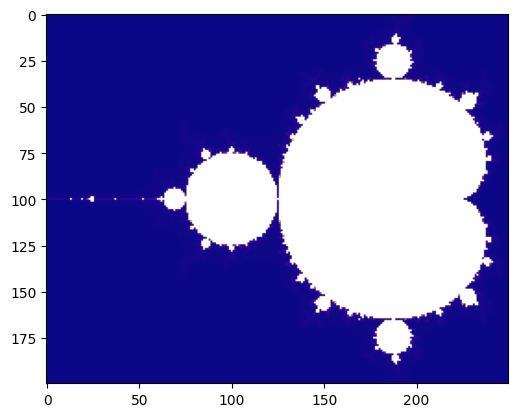
The mandelbrot set is a fractal, which is plotted on the complex plane. It shows how intricate can be formed from a simple equation.
It is generated using the algorithm:
\begin{align} Z_{n+1} & = z_{n}^2 + A \\ \end{align}
Where Z and A are complex numbers, and n represents the number of iterations.
First, import time to measure the elapsed execution times and create an ordered dictionary to keep all measures -> we are going to measure and plot the performance with different conditions!
[1]:
import time
from collections import OrderedDict
times = OrderedDict()
And then, all required imports
[2]:
from numpy import arange, abs, array
import numpy as np
Mandelbrot set implementation:
[3]:
def mandelbrot(a, max_iter):
    z = 0
    for n in range(1, max_iter):
        z = z**2 + a
        if abs(z) > 2:
            return n
    return np.nan
[4]:
def mandelbrot_set(y, X, max_iter):
    Z = [0 for _ in range(len(X))]
    for ix, x in enumerate(X):
        Z[ix] = mandelbrot(x + 1j * y, max_iter)
    return Z
Main function to generate the mandelbrot set. It splits the space in vertical chunks, and calculates the mandelbrot set of each one, generating the result Z.
[5]:
def run_mandelbrot(X, Y, max_iter):
    st = time.time()
    Z = [[] for _ in range(len(Y))]
    for iy, y in enumerate(Y):
        Z[iy] = mandelbrot_set(y, X, max_iter)
    elapsed = time.time() - st
    print("Elapsed time (s): {}".format(elapsed))
    return Z, elapsed
The following function plots the fractal inline (the coerced parameter <Boolean> is used to set NaN in coerced elements within Z).
[6]:
%matplotlib inline
def plot_fractal(Z, coerced):
    if coerced:
        Z = [[np.nan if c == -2**63 else c for c in row] for row in Z]
    import matplotlib.pyplot as plt
    Z = array(Z)
    plt.imshow(Z, cmap='plasma')
    plt.show()
Define a benchmarking function:
[7]:
def generate_fractal(coerced=False):
    X = arange(-2, .5, .01)
    Y = arange(-1.0,  1.0, .01)
    max_iterations = 2000
    Z, elapsed = run_mandelbrot(X, Y, max_iterations)
    plot_fractal(Z, coerced)
    return elapsed
Run the previous code sequentially:
[8]:
times['Sequential'] = generate_fractal()
Elapsed time (s): 34.045562744140625
Parallelization with PyCOMPSs
After analyzing the code, each mandelbrot set can be considered as a task, requiring only to decorate the mandelbrot_set function. It is interesting to observe that all sets are independent among them, so they can be computed completely independently, enabling to exploit multiple resources concurrently.
In order to run this code with we need first to start the COMPSs runtime:
[9]:
import os
import pycompss.interactive as ipycompss
if 'BINDER_SERVICE_HOST' in os.environ:
    ipycompss.start(project_xml='../xml/project.xml',
                    resources_xml='../xml/resources.xml')
else:
    ipycompss.start(project_xml='./project.xml',
                    resources_xml='./resources.xml',
                    graph=False, trace=True, monitor=1000)
********************************************************
**************** PyCOMPSs Interactive ******************
********************************************************
*          .-~~-.--.           ______        _   _     *
*         :         )         |____  \      | | | |    *
*   .~ ~ -.\       /.- ~~ .      __) |      | |_| |_   *
*   >       `.   .'       <     |__  |      |___   _|  *
*  (         .- -.         )   ____) |   _      | |    *
*   `- -.-~  `- -'  ~-.- -'   |______/  |_|     |_|    *
*     (        :        )           _ _ .-:            *
*      ~--.    :    .--~        .-~  .-~  }            *
*          ~-.-^-.-~ \_      .~  .-~   .~              *
*                   \ \ '     \ '_ _ -~                *
*                    \`.\`.    //                      *
*           . - ~ ~-.__\`.\`-.//                       *
*       .-~   . - ~  }~ ~ ~-.~-.                       *
*     .' .-~      .-~       :/~-.~-./:                 *
*    /_~_ _ . - ~                 ~-.~-._              *
*                                     ~-.<             *
********************************************************
* - Starting COMPSs runtime...                         *
* - Log path : /home/user/.COMPSs/Interactive_15/
* - PyCOMPSs Runtime started... Have fun!              *
********************************************************
It is necessary to decorate the mandelbrot_set function with the @task decorator.
Note that the mandelbrot_set function returns a list of elements.
[10]:
from pycompss.api.task import task
[11]:
@task(returns=list)
def mandelbrot_set(y, X, max_iter):
    Z = [0 for _ in range(len(X))]
    for ix, x in enumerate(X):
        Z[ix] = mandelbrot(x + 1j * y, max_iter)
    return Z
And finally, include the synchronization of Z with compss_wait_on.
[12]:
from pycompss.api.api import compss_wait_on
[13]:
def run_mandelbrot(X, Y, max_iter):
    st = time.time()
    Z = [[] for _ in range(len(Y))]
    for iy, y in enumerate(Y):
        Z[iy] = mandelbrot_set(y, X, max_iter)
    Z = compss_wait_on(Z)
    elapsed = time.time() - st
    print("Elapsed time (s): {}".format(elapsed))
    return Z, elapsed
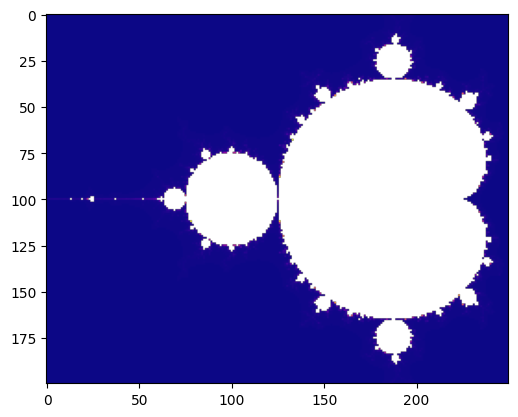
Run the benchmark with PyCOMPSs:
[14]:
times['PyCOMPSs'] = generate_fractal()
Found task: mandelbrot_set
Elapsed time (s): 20.446514129638672
Accelerating the tasks with Numba
To this end, it is necessary to either use:
the Numba’s
@jitdecorator under the PyCOMPSs@taskdecoratoror define the
numba=Truewithin the@taskdecorator.
First, we decorate the inner function (mandelbrot) with @jit since it is also a target function to be optimized with Numba.
[15]:
from numba import jit

@jit(nopython=True)
def mandelbrot(a, max_iter):
    z = 0
    for n in range(1, max_iter):
        z = z**2 + a
        if abs(z) > 2:
            return n
    return np.nan # NaN is coerced by Numba
Option 1 - Add the @jit decorator explicitly under @task decorator
Option 2 - Add the numba=True flag within @task decorator
[16]:
@task(returns=list, numba=True)
def mandelbrot_set(y, X, max_iter):
    Z = [0 for _ in range(len(X))]
    for ix, x in enumerate(X):
        Z[ix] = mandelbrot(x + 1j * y, max_iter)
    return Z
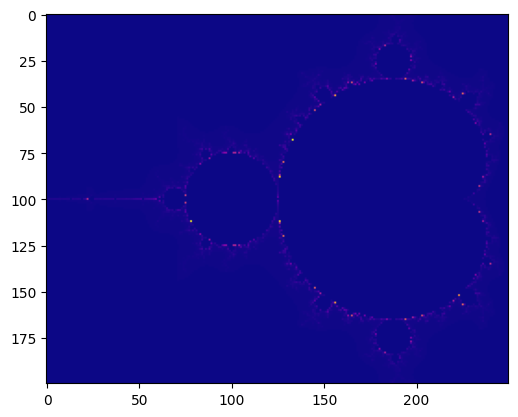
Run the benchmark with Numba:
[17]:
times['PyCOMPSs + Numba'] = generate_fractal(coerced=True)
Found task: mandelbrot_set
Elapsed time (s): 18.518999099731445
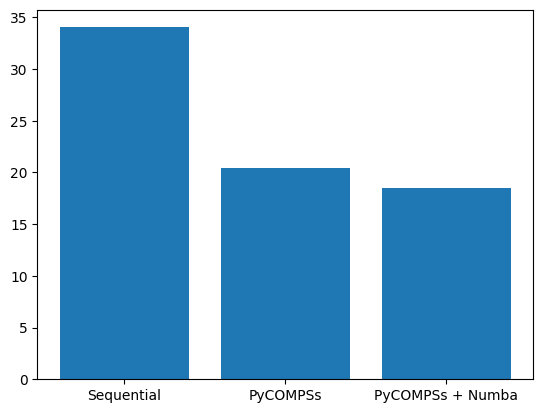
Plot the times:
[18]:
import matplotlib.pyplot as plt
plt.bar(*zip(*times.items()))
plt.show()
Stop COMPSs runtime
[19]:
ipycompss.stop()
********************************************************
***************** STOPPING PyCOMPSs ********************
********************************************************
Checking if any issue happened.
Warning: some of the variables used with PyCOMPSs may
         have not been brought to the master.
********************************************************